|
w: speed set-point e: deviation from speed set-point Kint: internal PI controller Kext: external controller u: control point G: controlled system (in out case one of the three drive motors) d: disturbance variable y: actual speed |
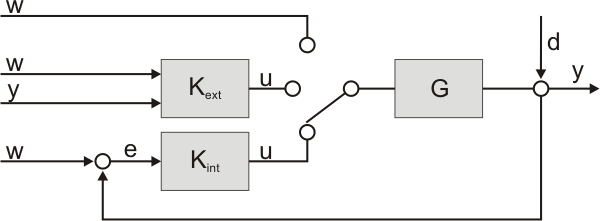
There are many possibilities to control Robotino's motors.
Method A: Internal PI controller with speed set-point via serial link
The default method is to generate speed set-point values for the three motors using Robotino View. The speed set-points are transmitted to Robotino's PC104 which transmits the values to the EA09 via the serial link. For each of the three drive motors there is a PI controller running at the EA09 by default (Kint). This internal PI controller calculates the control point u. The value of u directly sets the duty cycle of the PWM signal driving each motors H-bridge.
Method B: Internal PI controller with speed set-point via Ethernet
For in-depth inspection of the internal PI controller you might want to generate very fast changing speed set-points. You can configure the EA09 to not accept speed set-points via serial link any more but instead accept speed set-points send via Ethernet.
Method C: Internal PI controller with speed set-point via Telnet
First tests might be run by connecting to the EA09 via Telnet. If the EA09 is configured to accept speed set-points from the Telnet interface this is a very simple and direct way to drive Robotino's motors.
Method D: External PI controller with speed set-point via serial link
The EA09 can be configured to not use the internal PI controller any more. Instead the speed set-point (which is received via serial link) and the actual speed are transmitted via Ethernet at a rate of 1kHz to an external system. There you can do calculations and send the computed control point back to the EA09. The control point is then used to drive the motor's H-bridge.
Method E: External PI controller with speed set-point via Ethernet
This mode gives you maximum control over Robotino on the lowest level possible. The EA09 does not accept speed set-points received via serial link. Instead you are responsible to send speed set-points via Ethernet and also do the motor control on your external system.
Method F: External PI controller with speed set-point via Telnet
In this mode you concentrate on the motor control part while generating speed set-point values via the Telnet interface. This is an easy way to generate speed set-point pulses by setting the speed set-point from 0 to a high value.
Method G: Controller switched off
To get an impression of how important the motor controller is you can switch of motor control completely. In this case the speed set-point coming from any of the three sources (serial link, Ethernet or Telnet) is directly used as control point.